> For the complete documentation index, see [llms.txt](https://docs.oxygenserv.com/llms.txt). Markdown versions of documentation pages are available by appending `.md` to page URLs; this page is available as [Markdown](https://docs.oxygenserv.com/en/garrys-mod/ajouter-le-content-css.md).
# Add CSS content
Step-by-step guide to add CSS content to your game.
{% hint style="warning" %}
The “CSS content” is used to prevent pink textures / “missing” errors.\
It can be large. Use FTP (FileZilla recommended).
{% endhint %}
### Objective
Add the **Counter-Strike: Source content** to your Garry’s Mod server.
### Step-by-step guide
{% stepper %}
{% step %}
**Download the CSS content**
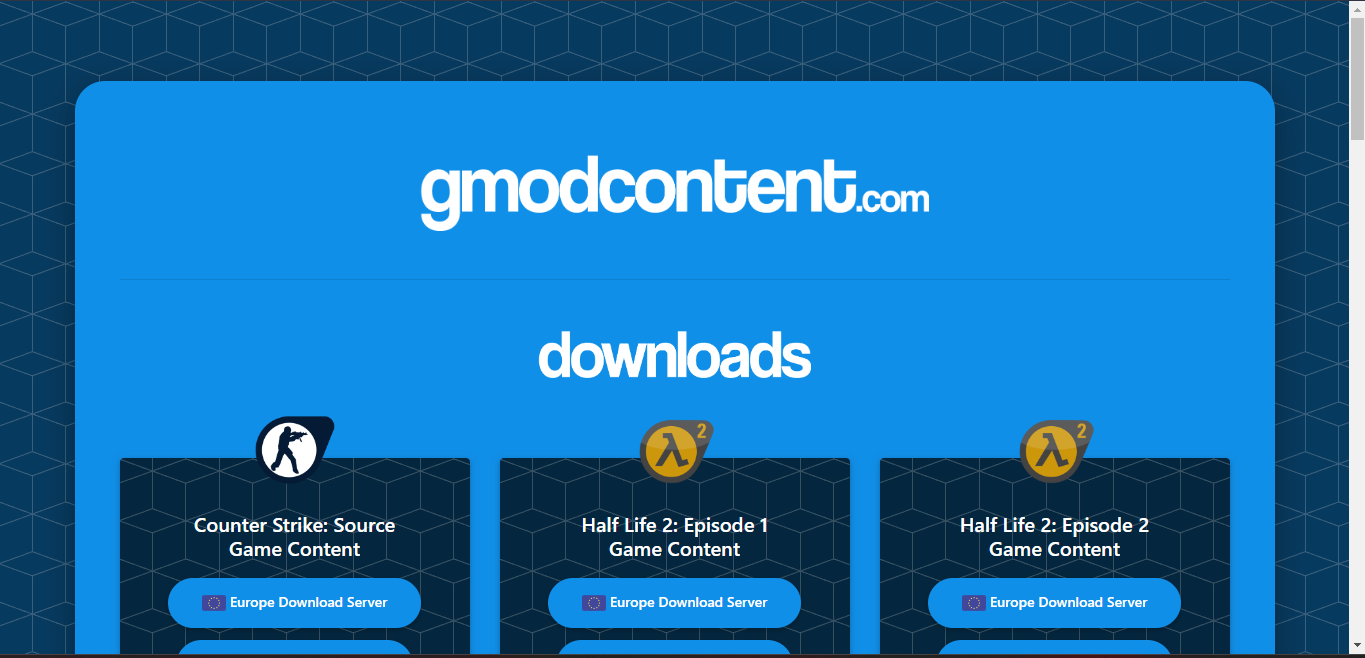
Go to:
Download **Counter Strike: Source Game Content**.\
You will get an archive `.zip`.
{% endstep %}
{% step %}
**Upload the folder into addons/**
Unzip the archive.
Copy the folder `css-content-gmod` into:
* `addons/` of your server
For FTP access: [Access my server files via FTP with FileZilla](/en/dashboard/acceder-aux-fichiers-de-mon-serveur-ftp-avec-filezilla.md).
{% endstep %}
{% step %}
**Restart and check**
Restart the server.
Join, then check that the textures display correctly.
{% endstep %}
{% endstepper %}
### Common issues
* **Textures still missing** : check that the folder is indeed in `addons/`.
* **Very slow upload** : use FileZilla and avoid Wi‑Fi.
* **The server no longer starts** : remove the added folder, then restart.
### FAQ
#### Do I have to install this on the server side or the player side?
On a server, install it on the server side.\
On the player side, it depends on the content used.